
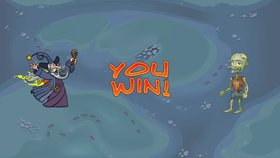
Win Screen
by Vivacious Expansion
originally from "Win Screen" by Acceptable Action
Remix Project
0
0
Description
In this tutorial, you will add to what you learned from the Lesson 7 tutorial. You'll learn how to add a win screen at the end of the game by broadcasting and receiving messages.
Tags
0-2, 2-4, 5-7, 8-9, 10-12, 13-14, 15-17, photo, drawing, animation, game, motion, artmusic, clicker
More from Vivacious Expansion (31)
More from Vivacious Expansion
Clone Projectiles
by Vivacious Expansion
Layers
by Vivacious Expansion
Make New Enemies
by Vivacious Expansion
Add Projectiles
by Vivacious Expansion
Create a Game
by Vivacious Expansion
Control the Dragon
by Vivacious Expansion
Create Your Own Adventure Game
by Vivacious Expansion
Open the Gate
by Vivacious Expansion
Boss Battle
by Vivacious Expansion
Multiple Lives 2
by Vivacious Expansion
Multiple Lives 1
by Vivacious Expansion
Fireball Tennis
by Vivacious Expansion


Share with Friends