
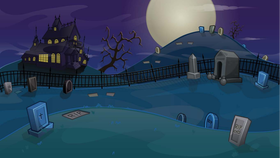
Haloween Game
by Liberating Alpaca
Remix Project
0
0
Description
-Add a spooky graveyard as the background. -Add the flying witch actor. -Control the Witch with the keyboard arrows Up, Down, Left and Right : When Up arrow is pressed, point towards top edge, move 10 pixels. Let's test and see what happens. There are a couple of things we need to do: 1- We need to change the initial direction of the witch ( She need to point towards the right) 2- We then need to change sprite rotation to “Flip Horizontally" -Add Three Halloween actors that the Witch will be collecting. -Make these 3 actors disappear and appear every 1-3 seconds in a random spot on the screen. -Make these actors play a sound when the Witch touches it.
Remixes of "Haloween Game" (1)
VIEW ALL REMIXES
More from Liberating Alpaca (3)
More from Liberating Alpaca


Featured
More Featured Projects
Undersea Arcade
by Adventurous Selenium

Ninja Draw 1702 Emma and Andy
by Tested Lemming

Moni and Georgi 1702 mirror draw
by Tested Lemming

Тео и Косе 1722 красиво е
by Tested Lemming

Алекс И Спас 1722 чочовски картини
by Tested Lemming

Nori Maxi Ema😍🦄😻
by Tested Lemming

Happy Easter!
by Tested Lemming

tervel
by Tested Lemming

tedi i vladi
by Tested Lemming

Плами и Иве 1722 красиви картини
by Tested Lemming

Drawing
by Tested Lemming

викторина
by Tested Lemming
Share with Friends