
-
February 27, 2016

You Can Run a Programming Camp with Tynker!
You Can Run a Programming Camp with Tynker! With Tynker, you can easily integrate programming into your camp. Our curriculum teaches kids to code in a fun, creative, collaborative way. They learn through games, puzzles, and projects, and rapidly gain skills that allow them to build custom games that they can show off to their family and friends. Our camp solution […]
0 -
February 20, 2016

New Kid Characters for Unlimited Creation
New Kid Characters for Unlimited Creation Tynker’s Character Creator is one of the many reasons students love using Tynker. Feedback from our users inspired us to create a new set of characters that reflect the kids who are learning to code with our products. With the new kid characters, students can create characters that look like themselves and add realistic, high-quality animations […]
0 -
February 16, 2016

Valentine’s Day Coding with Tynker
Thanks so much to all the teachers and students around the world who used Tynker to make their Valentine’s Day cards this year. We loved seeing students’ creations and were thrilled by the excitement, collaboration, and creativity that went into these projects. We even heard from a few lucky parents and grandparents who received Valentine’s Day cards from young coders! […]
0 -
February 3, 2016
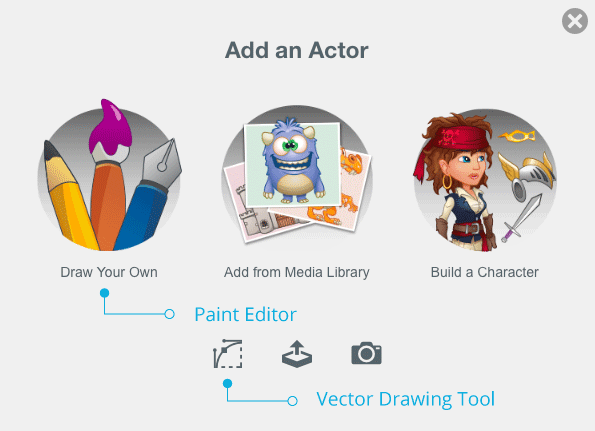
Web Update: New Paint Editor Drawing Tool
Web Update: New Paint Editor Drawing Tool The Tynker Workshop on Web has a new drawing tool that will make it even easier for students to draw assets for their projects. This new tool is called the paint editor, and it’s more intuitive for kids to learn and use. Our old vector drawing tool is still available and is still […]
0 -
January 30, 2016

Draw Custom Graphics with the Tynker App
New! Learn How to Draw Custom Graphics with the Tynker App With the new Tynker app update, children can draw their own assets for the games and projects they program. This gives them an awesome new degree of freedom to create fun and exciting projects. From designing game assets to drawing Actors for school projects to creating custom stop-motion animations, Tynker’s […]
0 -
January 29, 2016

Free Teacher Resources and Training Webinar
Free Teacher Resources and Training Webinar From teacher training videos to our Community Forum, we have tons of free educator resources to make sure you get the most out of teaching coding with Tynker! Whether you’re a Tynker Teacher or your school or district’s Tynker Administrator, it’s easy to get the hang of our platform in just a few minutes. Get […]
0 -
January 26, 2016

Safe Sharing with the Tynker App
Safe Sharing with the Tynker App With Tynker’s publishing feature, kids can share the amazing projects they’ve built and see what others are making. The Tynker app allows children to publish projects that they’ve built to the Tynker community. Other kids can see published projects, “heart” them to bookmark them and show support, explore projects to see how they work, then […]
0 -
January 19, 2016

Five Inspiring Ways that Technology is Making the World Better
Five Inspiring Ways that Technology is Making the World Better Every year, the Nominet Trust names 100 people and organizations using digital technology to address the world’s biggest social problems. Tynker is honored to be chosen as one of the Nominet Trust 100 2015 for our efforts to empower children by teaching them to program in a fun, engaging way. […]
0 -
December 19, 2015

Drone Giveaway Winners Announced
We’re excited to announce the winners of our Drone Giveaway! Many thanks to the teachers who entered, the teachers who won, and all the teachers around the world working to bring programming and technology into the classroom. To learn about future giveaways, updates, and information about how to introduce kids to programming, subscribe to our newsletter. Jan. 29, Week 5 Winners: Darwin Graser – Salk Middle […]
0
 Coding for Kids > Blog